
Shoutcheap
  • Home
  • Services
    • SHOUTcast Hosting
      • SHOUTcast 32kbps Plans
      • SHOUTcast 64kbps Plans
      • SHOUTcast 96kbps Plans
      • SHOUTcast 128kbps Plans
      • SHOUTcast 192kbps Plans
      • SHOUTcast 256kbps Plans
    • ICEcast Hosting
      • ICEcast 32kbps Plans
      • ICEcast 64kbps Plans
      • ICEcast 96kbps Plans
      • ICEcast 128kbps Plans
      • ICEcast 192kbps Plans
      • ICEcast 256kbps Plans
    • School & College Audio Streaming
  • Studio
    • PLayer Studio
    • MP3tag Studio
  • FAQ
  • Blog
  • Contact Us
  • Client Area
    • Account Login
    • Cast Control
    • Knowledgebase
    • Submit Ticket
  • More Pages
    • Mobile Player
  • Home
  • Services
    • SHOUTcast Hosting
      • SHOUTcast 32kbps Plans
      • SHOUTcast 64kbps Plans
      • SHOUTcast 96kbps Plans
      • SHOUTcast 128kbps Plans
      • SHOUTcast 192kbps Plans
      • SHOUTcast 256kbps Plans
    • ICEcast Hosting
      • ICEcast 32kbps Plans
      • ICEcast 64kbps Plans
      • ICEcast 96kbps Plans
      • ICEcast 128kbps Plans
      • ICEcast 192kbps Plans
      • ICEcast 256kbps Plans
    • School & College Audio Streaming
  • Studio
    • PLayer Studio
    • MP3tag Studio
  • FAQ
  • Blog
  • Contact Us
  • Client Area
    • Account Login
    • Cast Control
    • Knowledgebase
    • Submit Ticket
  • More Pages
    • Mobile Player

Waves Nx 3D Audio Turn Your Headphones Into A Mixing Studio
Jul 1, 2019ShoutCheapblog

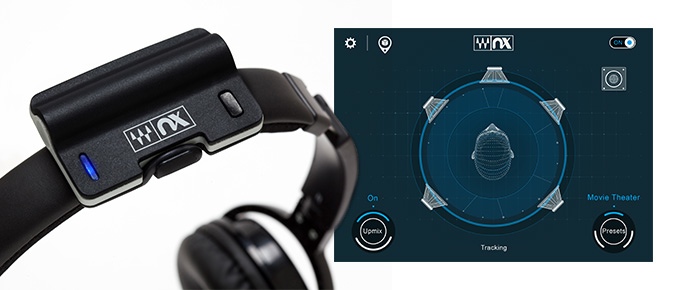
Waves Nx

Waves Nx is the first application to
bring personalized 3D sound
to any pair of headphones.

Waves Nx developed by the leader in audio processors Waves Audio. Nx Allow you to listen 3D audio using any Headphones called Nx. Waves Nx is an application that you install on your desktop computer or mobile device. Once the application is installed, Nx recreates – on any set of headphones – the same three-dimensional experience as listening to sound in the real world.


Check the Kickstarter page of Waves Nx at: WAVES Nx 3D AUDIO ON ANY HEADPHONES

Related posts:

  1. How do i get listed on Windows Media Radio Guide?
  2. Facebook App Player For Shoutcast And Icecast Audio streaming
  3. Make It Obvious How to Listen to Your Internet Radio Station
  4. Best Desktop Microphones
Tags: 3D Audio,  app,  Headphones,  Plugin,  Surround Sound
← What Kind of Internet Connection Do I Need to Be Able to Stream Radio on My PC?
Best Desktop Microphones →

Search

Subscribe to Blog via Email

Enter your email address to subscribe to this blog and receive notifications of new posts by email.

Join 238 other subscribers

Most Viewed

  • Best Radio Broadcasting Software – Audio Streaming - 238,359 views
  • Creating and Setting Up a Internet Radio Station - 180,607 views
  • Facebook App Player For Shoutcast And Icecast Audio streaming - 78,835 views
  • Internet Radio Directories: How to Submit and Promote Your Station - 73,754 views
  • How to Get More Listeners for your Radio Station - 63,147 views

Recent Posts

  • Your radio station sounds great. But your player is what people see first.
  • Your MP3 tags are broken, and your listeners can see it. Fix them in seconds, right in your browser.
  • How to Create a Modern Pop-Up Player for SHOUTcast and Icecast in 2026
  • Best HTML5 Player for SHOUTcast, Icecast, MP3, AAC, and OGG
  • Audio Hosting Requirements for Music vs Talk Stations

Online Support

  • Pre-Sales Questions
  • Knowledgebase
  • Submit Ticket

Payment Options

  • PayPal
  • Credit Card
  • Debit Card
  • Accepted payment methods at ShoutCheap

Search

Social


Facebook


X


YouTube


RSS

Copyright © 2009-2026 ShoutCheap, Inc. All rights reserved.

  •  shares
  • 73
  • 8
  • 4
  • 0